Firefox Source Docs Logo

Quick search

Overview

  • A Glossary of Common Terms
  • A Quick Guide to Mozilla Applications

Getting Started

  • Getting Set Up To Work On The Firefox Codebase

Working On Firefox

  • Working on Firefox
  • Bug Handling

Firefox User Guide

  • Firefox DevTools User Docs

Source Code Documentation

  • Governance
  • Firefox Front-end
    • How-To’s
    • Address Bar
    • Browser Usage Telemetry
    • Frontend Code Review Best Practices
    • Command Line Parameters
    • Browser Startup
    • Category manager indirection (callModulesFromCategory)
    • CustomizableUI Component
    • Enterprise Policies
    • Web Apps in Firefox
    • Form Autofill
    • Firefox Home (New Tab)
    • Firefox Welcome Experience (about:welcome)
    • Installer
    • Installation Attribution
    • Default Browser Agent
    • Migration
    • PageDataService
    • Places
    • Messaging System
      • Vision
      • What does Messaging System support?
      • Messaging System Overview
      • Message Routing
      • UI Templates
        • Moments Page
        • Feature Callout
        • Contextual Feature Recommendation
        • About Welcome
        • Infobars
        • Spotlight
        • PrivateBrowsing
        • Multi-Message
        • MenuMessage
      • Detailed Docs
    • Search UI
    • IP Protection
    • tabbrowser
    • Touch Bar
    • UITour
    • Firefox Branding
    • Storybook for Firefox
    • Reusable UI widgets
    • Other types of UI Widgets
    • Lit
    • XUL and HTML
    • Figma Code Connect
    • Design Tokens
    • Backup Component
    • Sidebar
    • moz-cached-ohttp Protocol
  • DOM
  • Editor
  • Style system (CSS) & Layout
  • Graphics
  • Processes, Threads and IPC
  • Firefox DevTools Contributor Docs
  • Toolkit
  • SpiderMonkey
  • JS Loader
  • GeckoView
  • Fenix
  • Focus for Android
  • WebIDL
  • libpref
  • Networking
  • Remote Protocols
  • Services
  • Permissions
  • File Handling
  • Firefox on macOS
  • Firefox on Windows
  • Firefox AI Runtime
  • Accessibility
  • Media Playback
  • Code quality
  • Writing Rust Code
  • Rust Components
  • Gecko Profiler
  • Performance
  • Database bindings (SQLite, KV, …)
  • XPCOM
  • NSPR
  • Network Security Services (NSS)
  • Web Security Checks in Gecko

The Firefox Build System

  • Mach
  • Pushing to Try
  • Build System
  • Firefox CI and Taskgraph
  • Managing Documentation
  • Vendoring Third Party Components

Testing & Test Infrastructure

  • Automated Testing
  • Understanding Treeherder Results
  • Sheriffed intermittent failures
  • Turning on Firefox tests for a new configuration
  • Avoiding intermittent tests
  • Debugging Intermittent Test Failures
  • Testing Policy
  • Configuration Changes
  • Browser chrome mochitests
  • Chrome Tests
  • Marionette
  • geckodriver
  • Test Verification
  • WebRender Tests
  • Mochitest
  • XPCShell tests
  • TPS
  • web-platform-tests
  • GTest
  • Fuzzing
  • Sanitizer
  • Performance Testing
  • Code coverage
  • Testing & Debugging Rust Code

AI Agent Tools

  • AI Agent Tools for Firefox Development

Releases & Updates

  • Mozilla Update Infrastructure
  • Watershed Updates
  • Desupport Updates
  • Update Verify

Localization & Internationalization

  • Internationalization
  • Localization

Firefox and Python

  • mozbase
  • Using third-party Python packages

Metrics Collected in Firefox

  • Metrics
Firefox Source Docs
  • Firefox Front-end
  • Messaging System
  • MenuMessage
  • Report an issue / View page source

MenuMessage

MenuMessage displays a contextual call-to-action card inside Firefox’s panel menus: the App Menu (hamburger) and the PXI Menu (Firefox Accounts avatar panel).
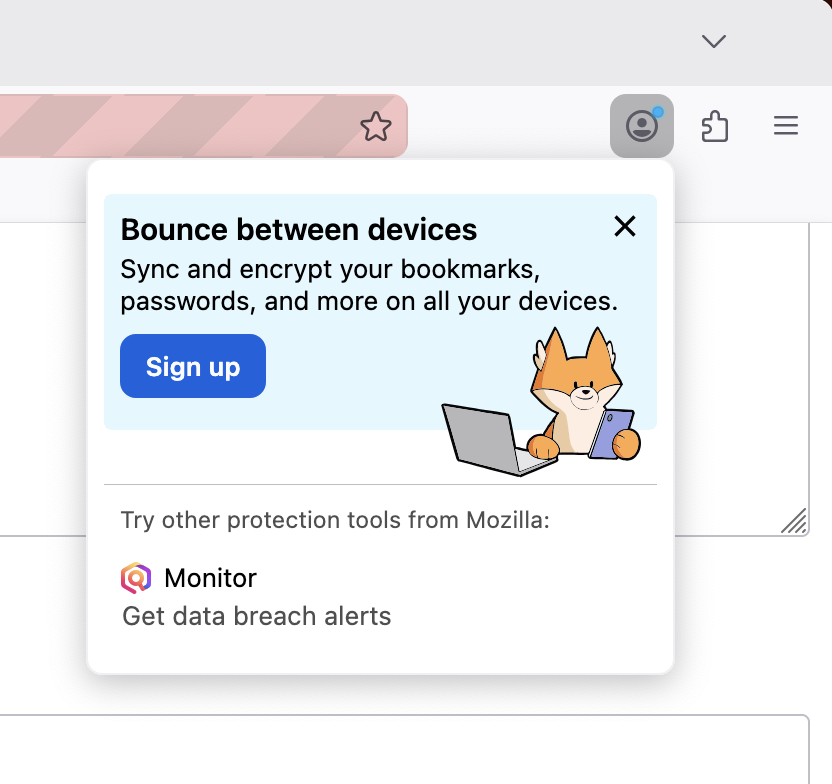
MenuMessage in the PXI Menu

Surfaces

Surface

testingTriggerContext

Supported messageType

App Menu

app_menu

fxa_cta, default_cta

PXI Menu

pxi_menu

fxa_cta only

Message Types

  • fxa_cta: Firefox Accounts sign-in prompt. Hidden for signed-in users unless allowWhenSignedIn: true. Available in both the App Menu and PXI Menu.

  • default_cta: General CTA. App Menu only. Always shown regardless of sign-in state.

Layouts

  • column (default): Illustration above text with a button stack below.

  • row: Text on the left, button and illustration on the right.
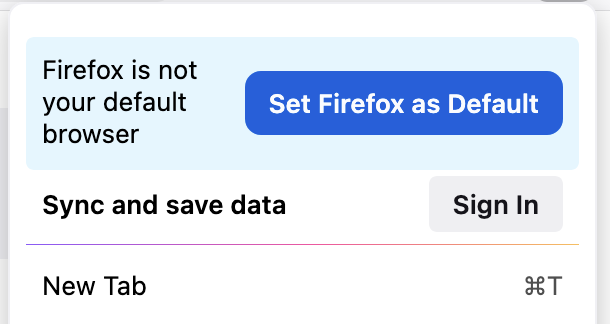
  • simple: Single row with primary text and button only — no image or secondary text.

Testing Menu Messages

Via the dev tools:

  1. Set browser.newtabpage.activity-stream.asrouter.devtoolsEnabled to true in about:config

  2. Go to about:asrouter

  3. Select panel as the provider and find messages with "template": "menu_message"

  4. Click Show — the testingTriggerContext field on the message determines which menu surface is simulated

  5. Paste custom JSON in the text area and click Modify to preview changes

Via Experiments:

Messaging Journey

Example JSON

PXI Menu — fxa_cta with row layout

{
  "id": "FXA_ACCOUNTS_PXIMENU_ROW_LAYOUT",
  "template": "menu_message",
  "content": {
    "messageType": "fxa_cta",
    "layout": "row",
    "primaryText": "Bounce between devices",
    "secondaryText": "Sync and encrypt your bookmarks, passwords, and more on all your devices.",
    "primaryActionText": "Sign up",
    "primaryAction": {
      "type": "FXA_SIGNIN_FLOW",
      "data": {
        "where": "tab",
        "extraParams": {
          "utm_source": "firefox-desktop",
          "utm_medium": "product",
          "utm_campaign": "some-campaign",
          "utm_content": "some-content"
        },
        "autoClose": false
      }
    },
    "closeAction": {
      "type": "BLOCK_MESSAGE",
      "data": {
        "id": "FXA_ACCOUNTS_PXIMENU_ROW_LAYOUT"
      }
    },
    "imageURL": "chrome://browser/content/asrouter/assets/fox-with-devices.svg",
    "imageWidth": 100,
    "imageVerticalTopOffset": -4,
    "imageVerticalBottomOffset": -32,
    "containerVerticalBottomOffset": 20
  },
  "trigger": { "id": "menuOpened" },
  "testingTriggerContext": "pxi_menu"
}

App Menu — default_cta with simple layout

{
  "id": "APP_MENU_DEFAULT_CTA_EXAMPLE",
  "template": "menu_message",
  "content": {
    "messageType": "default_cta",
    "layout": "simple",
    "primaryText": "Try Firefox Relay",
    "primaryActionText": "Learn more",
    "primaryAction": {
      "type": "OPEN_URL",
      "data": {
        "args": "https://relay.firefox.com/",
        "where": "tab"
      }
    },
    "closeAction": {
      "type": "BLOCK_MESSAGE",
      "data": {
        "id": "APP_MENU_DEFAULT_CTA_EXAMPLE"
      }
    }
  },
  "trigger": { "id": "menuOpened" },
  "testingTriggerContext": "app_menu"
}

Schema

MenuMessage.schema.json

Related Docs

  • Targeting attributes

  • Triggers

  • Special Message Actions

Previous Next

Built with Sphinx using a theme provided by Read the Docs.